GH Actions: I Moved the GitHub Actions Tab Into WebStorm
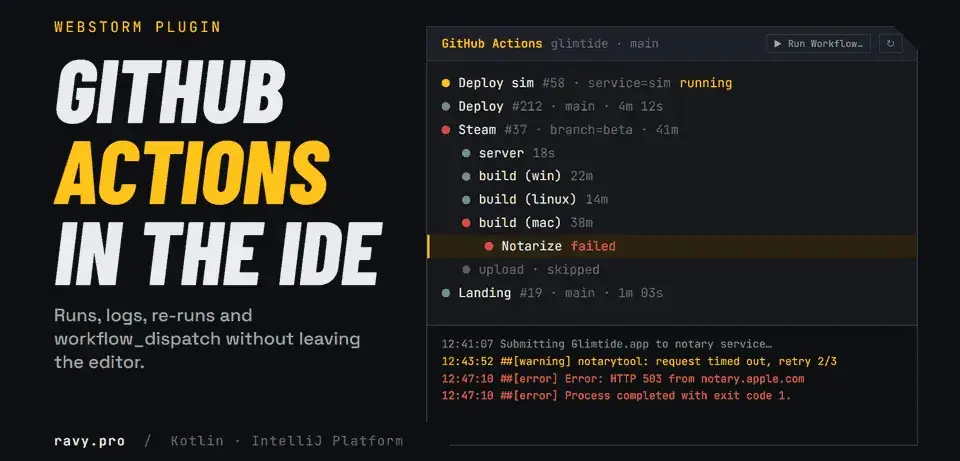
A WebStorm plugin for GitHub Actions: runs, logs, re-runs and workflow_dispatch in the IDE. Why Glimtide's CI made me write it, and how it is built.
Glimtide has six GitHub Actions workflows. One of them builds the Steam version for Windows, Linux and macOS, signs and notarizes the Mac app, smoke-tests every binary and uploads the lot to Steam. It runs for the better part of an hour, and I start it by hand. For weeks a good share of my day went into a browser tab, watching it.
So I wrote GH Actions, a plugin that puts the Actions tab inside WebStorm: runs, jobs, steps, logs, re-runs, and the Run workflow button with its inputs. It is free, and the source and builds are on GitHub: Rovniy/github-actions-viewer.
The pain: CI lives in another window
GitHub's Actions page is fine for looking at one run. It is bad at being the thing you check forty times a day.
The usual loop goes like this. Push from the IDE. Switch to the browser and find the right tab. Open Actions, filter by workflow, open the run, open the job, expand the red step, wait for the log, scroll to the error. Switch back to the IDE, fix it, push, and go round again.
Starting a workflow by hand is worse. Run workflow is a small form behind a dropdown: pick a branch, fill in the inputs. If you do not remember which values an input takes, you open the YAML in yet another tab to check.
None of these steps is hard. Each one is a context switch, and context switches are what actually eat a working day. I wanted the CI status in the same window as the code that broke it.
How Glimtide got me here
Glimtide is a living-island simulation: a server world, a gateway, an API, a narrator, a website, an admin panel, and now a Steam client. Every piece of it ships through GitHub Actions:
| Workflow | Trigger | What it does |
|---|---|---|
| CI | pull requests, branches, called by the others | lint, types, tests |
| Deploy | push to main | CI, then Docker images for three targets in a matrix, then deploy |
| Deploy sim | by hand, input service: sim, gateway, backup or all | rebuilds and restarts one part of the live world |
| Landing | push to main touching the site, or by hand | deploys glimtide.io |
| Module release | tag module/* | releases a world module |
| Steam | by hand, inputs branch and skip_server_check | checks the server protocol, builds three platforms, notarizes, smoke-tests, uploads with SteamCMD |
That is 492 lines of YAML, 233 of them in the Steam workflow alone, and 22 of the repository's 128 commits touched .github. Commit titles like "robust macOS notarization with custom retry logic" and "improve Windows smoke test reliability… multiple retry attempts" each stand for an evening of runs that failed, got restarted, and failed somewhere else.
The Steam build is where the browser tab hurt most. The Mac job is allowed an hour, because notarization waits on Apple's servers, and Apple's servers sometimes answer 503. When that happens 40 minutes in, the Windows and Linux builds are already green. You do not want to rebuild them, you want Re-run failed jobs. GitHub has that button, on the page of the run, which you first have to find.
Deploy sim is the opposite: a two-minute job with a choice input. I start it several times on a busy day, and every time it is a trip to the browser to pick one word from a list.
At some point the obvious thought arrived: this belongs in a tool window, next to the code.
What the plugin does
GH Actions adds a GitHub Actions tool window to the bottom of the IDE. It finds the repository from the project's git remotes (origin first, then upstream, then any GitHub remote), so there is nothing to configure per project. GitHub Enterprise hosts work too.
- A tree of runs → jobs → steps with statuses and durations. Filter by workflow, or show only the current branch.
- Logs of a job or a single step in a console, with errors and warnings highlighted and optional timestamps.
- Run Workflow… triggers
workflow_dispatch. The form is built from your local workflow file. - Re-run all jobs, Re-run failed jobs, Re-run selected job, Re-run with debug logging, Cancel run.
- Open on GitHub and Open workflow file for when you need the full page or the YAML.
- Auto-refresh every 15 seconds while the tool window is visible, and none while it is hidden.
The Run Workflow form is the part I use most. This is the trigger of Glimtide's Deploy sim:
on:
  workflow_dispatch:
    inputs:
      service:
        description: What to deploy
        type: choice
        options: [sim, gateway, backup, all]
        default: sim
In the plugin a choice input becomes a dropdown with those four options, a boolean becomes a checkbox, everything else becomes a text field with its default filled in. Required inputs are checked before anything is sent. For the Steam workflow that means a beta field and a "skip server check" checkbox, which is exactly what I want to see at that moment.
What it cannot do
Some limits come from GitHub and some from me. Better you read them here than find them yourself.
- No re-running a single step. GitHub cannot do that, either in the API or in its own web UI. The smallest unit is a job, which is why the plugin offers Re-run selected job and Re-run failed jobs.
- No live log of a running job. GitHub serves job logs through the API only once the job has finished.
- Step logs are cut by time. A job log has no step markers, so lines are matched to a step by its start and end timestamps. A line from a neighbouring step logged in the same second can turn up at the edge.
- The form reads your local file. If the inputs changed on another branch, you see the local version.
- It is version 0.1. It is not on the JetBrains Marketplace yet, so you install the zip from disk and update by hand. It is built and tested against WebStorm 2026.1. Other JetBrains IDEs with the Git plugin should load it, but I have not tried them.
How it is built
It is a regular IntelliJ Platform plugin:
- Kotlin 2.3, the IntelliJ Platform Gradle Plugin 2.x, Gradle 9.8, JDK 21.
- Targets WebStorm 2026.1 (build 261) with no upper bound, so new IDE versions load it.
- One dependency besides the platform: the bundled Git4Idea plugin, for remotes and the current branch.
- No third-party libraries. HTTP is the JDK's
java.net.http.HttpClient, JSON is the Gson that ships with the IDE. - About 1,500 lines of Kotlin, plus unit tests for the parts that are pure logic.
GhActionsToolWindowFactory
        │ creates
        ▼
GhActionsPanel ──► RepoDetector (Git4Idea)       which repo / branch
   │   │      ──► TokenProvider                  which token
   │   │      ──► GitHubApiClient                REST calls (pooled thread)
   │   └─ Tree (RunData → JobData → StepData)    renderer, status icons
   └──── ConsoleView                              LogFormatter renders logs
A few decisions that took longer than the line count suggests.
Where the token comes from
The plugin takes the first token it finds: the one in Settings | Tools | GitHub Actions (kept in the IDE's password safe, never in a settings file), then GITHUB_TOKEN or GH_TOKEN from the environment, then gh auth token. If you have ever run gh auth login, you configure nothing at all. A classic token needs the repo scope; a fine-grained one needs Actions: Read and write on the repository.
Logs come through a redirect
GET /actions/jobs/{id}/logs does not return the log. It answers with a redirect to a signed URL in blob storage, and that storage rejects a request carrying someone else's Authorization header. So the client follows the redirect itself and drops the header on the way:
fun jobLog(jobId: Long): String {
    val response = send(request("$base/actions/jobs/$jobId/logs").GET().build())
    return when (response.statusCode()) {
        200 -> response.body()
        301, 302, 303, 307, 308 -> {
            val location = response.headers().firstValue("Location")
                .orElseThrow { GitHubApiException(response.statusCode(), "Redirect without Location header") }
            // The signed blob URL must be fetched without the GitHub token.
            val blob = httpClient.send(
                HttpRequest.newBuilder(URI(location)).timeout(TIMEOUT).GET().build(),
                HttpResponse.BodyHandlers.ofString(StandardCharsets.UTF_8),
            )
            if (blob.statusCode() != 200) throw GitHubApiException(blob.statusCode(), "Failed to download log")
            blob.body()
        }
        else -> throw error(response)
    }
}
Logs of finished jobs are cached in memory by job id. A finished log never changes, so there is no reason to download it twice.
Reading YAML without a YAML parser
The Run Workflow form needs on.workflow_dispatch.inputs. Depending on the IDE's YAML plugin would tie this one form to another plugin being installed and enabled, so WorkflowInputsParser does a small indentation-based scan instead. It handles the block-style YAML everyone writes. It does not handle flow-style mappings for inputs, and the rule in the repo is to add a test case before extending it.
Refreshing without flicker
Every network call runs on a pooled thread, and the result comes back to the UI thread only if the panel still exists. A refresh rebuilds the tree, then restores what was expanded and selected by a stable key, so the tree does not snap shut every 15 seconds. The log view reloads only when the selected node's status changes, so the console does not blink under your cursor while you read.
The cost is small. One refresh is one or two requests plus one for each expanded run, so at the default interval it stays far below GitHub's 5,000 requests an hour for an authenticated user.
The plugin's own CI
The plugin ships through GitHub Actions too, of course. Every push to main runs the tests, builds the zip, checks the plugin structure and publishes a GitHub release. The version is 0.1.<run number>, so every release is numbered higher than the last without a single commit back to the repository, and the workflow needs no secrets beyond the built-in GITHUB_TOKEN.
Install it
- Download
github-actions-plugin-<version>.zipfrom the latest release. - In WebStorm open Settings | Plugins | ⚙ | Install Plugin from Disk… and pick the zip. Do not unpack it.
- Open View | Tool Windows | GitHub Actions.
If gh is logged in, you are done. Otherwise add a token in Settings | Tools | GitHub Actions or export GITHUB_TOKEN.
How to support it and say thanks
The plugin is free and will stay free. If it saves you a few trips to the browser, here is what actually helps:
- Star the repository. It is the clearest sign that someone uses the thing, and it is how a small plugin gets found.
- Open an issue with a bug or a missing feature. Tell me which IDE and version you use: reports from IDEs other than WebStorm are the ones I cannot produce myself.
- Pass it to a colleague who keeps a browser tab on Actions all day. You know who they are.
- Wishlist Glimtide on Steam. This plugin exists because of that game's CI, and wishlists are what get a small game seen at launch.
- Write to me on Telegram, X or LinkedIn. "Thanks, it saved me some clicks" is a perfectly good thank-you, and I read every one.
And if your team's CI/CD has grown into something that needs its own browser tab, that is the kind of problem I like working on: see services.