I wrote an HTML/CSS/JS engine for Unity game interfaces
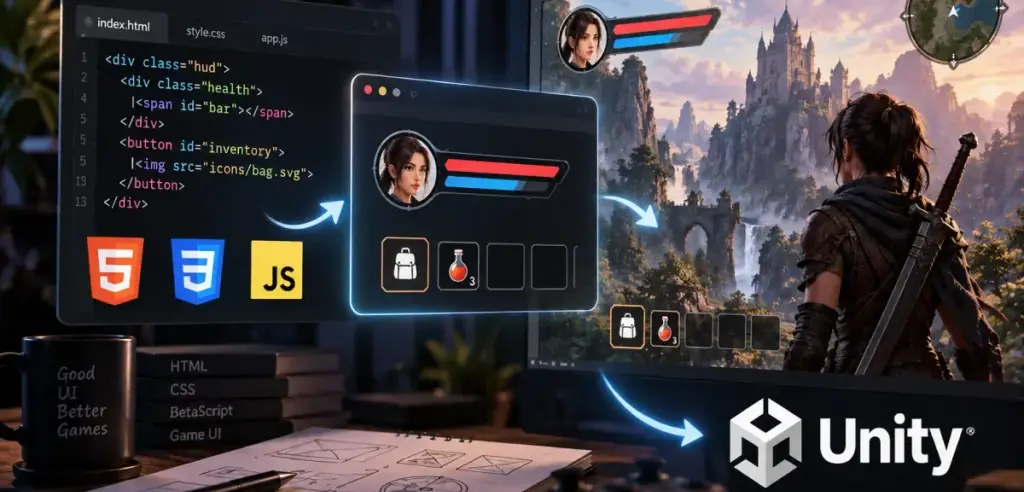
I built an open-source runtime that renders HTML, CSS and JavaScript straight into a Unity texture on the GPU. Why I did it, and what a frame costs.
Game UI is the part of a game that gets rewritten most. Menus, HUD, inventory, settings, the shop. All of it changes after every playtest, every time a designer looks at the screen and says the button should sit further left. In Unity each of those "further left" costs a recompile, a scene restart, and a dozen clicks to get back to the screen you were looking at.
The web has been solving that exact problem for thirty years. Layout, text, state, animation. It solved it well enough that an entire profession grew around it.
So I built xploit_game_ui, a runtime that paints an ordinary HTML page straight into a Unity texture, on the GPU, in the same process as the game.
<div class="hud">
  <div class="health"><span id="bar" style="width: 75%"></span></div>
  <button id="inventory">Inventory</button>
</div>
document.getElementById('inventory').addEventListener('click', () => Unity.emit('inventory'));
Unity.on('healthChanged', v => bar.style.width = v + '%');
const ammo = await Unity.call('getAmmo');
view.Load("UI/HUD/index.html");
view.On("inventory", e => OpenInventory());
view.RegisterFunction("getAmmo", _ => ammo);
view.Send("healthChanged", 75f);
That is the whole integration. Edit the CSS, hit reload, see the result.
The project is open under Apache-2.0: github.com/Rovniy/xploit_game_ui.
Why not use something that already exists
The first question any sensible person asks. Here are the answers in order.
Coherent Gameface is exactly the thing I wanted, which is why it costs what a cast iron bridge costs. It is an enterprise licence with a negotiation attached, not a line in packages.json. For a five person studio, or for one person, that conversation never starts.
Ultralight is free until you make money and paid once you do. The price of entry is zero right up to the moment the project succeeds, which is the worst possible moment to discover a licensing dependency.
CEF and embedded Chromium put a second Chrome inside your game. A separate process tree, a hundred megabytes, a networking stack nobody asked for, and a frame budget you do not control. Chromium is a beautiful piece of engineering built for a completely different job: showing any site on the internet. You need to show your thirteen screens.
Unity's own UI Toolkit, with UXML and USS, is an honest attempt and it does work. But it is a language that resembles HTML and a language that resembles CSS, not those languages themselves. That means its own tooling, its own quirks, and experience that transfers in neither direction. You cannot sit a web developer in front of UI Toolkit and say "you already know CSS."
RmlUi is the closest thing in open source. RML and RCSS drift from real HTML and CSS the same way, and the whole thing arrives as one monolithic dependency you cannot take apart.
That left building it. Not a browser. A runtime.
The rule: do not build a second Chrome
This became the governing rule of the project, and it decided everything else.
A browser has to render any page on the internet. Game UI has to render your page, the one you wrote, that ships next to the game and never changes after the build. That is a different problem, and it lets you throw away roughly ninety per cent of what a browser is made of. Networking, cross origin rules, history, cookies, process isolation, twenty years of legacy quirks.
What remains is the core. Parse HTML, apply CSS, compute layout, paint, run scripts, take input.
Someone has already solved each of those very well. The job was to assemble existing pieces in a way that keeps every piece replaceable.
| Job | Component | Why this one |
|---|---|---|
| HTML parsing | lexbor | A complete HTML5 parser in C, Apache-2.0, no dependencies |
| JavaScript | V8 | The same engine Chrome runs. Nothing to argue about |
| Layout | Yoga | React Native's flexbox, proven across millions of screens |
| Text and rasterising | Skia | Chrome's renderer, plus skparagraph with HarfBuzz and ICU |
The DOM, the CSS cascade and the paint order are mine. That is about twenty thousand lines of C++20, and there are reasons for each.
The DOM has to keep the computed style, the layout box, the dirty bits, the listeners and the JavaScript wrapper slot on the node itself. Somebody else's DOM will not give you those fields, and without them every frame turns into hash table lookups.
The CSS cascade turned out to be the largest module at 5,800 lines, more than layout and painting combined. I did try lexbor's css module first. It types about forty five properties, and border-radius, background-*, box-shadow, transform and gap all come out of it as "some custom token, you work it out." So a value parser was needed either way, and using both would have meant two parsing paths with inconsistent errors. I wrote one: a tokenizer of 380 lines plus value and shorthand parsing in another 900.
It also turned out that lexbor's selector module treats :hover and :focus as ordinary DOM attributes. For a browser that is a tolerable simplification. For game UI it is not, because those states arrive from input and have to invalidate exactly what could have changed and nothing else.
The interesting part: how a frame reaches Unity
This is the piece the whole thing was built around.
Skia can render on Direct3D 12. Unity runs on Direct3D 12. The naive path is to give Skia its own device, render, then copy the pixels into Unity's texture. That is a full screen copy every frame.
The real path is to build Skia's GrDirectContext on top of Unity's own device and command queue. Unity hands them over through the IUnityGraphicsD3D12v8 interface, provided you ask for a plugin event in kUnityD3D12GraphicsQueueAccess_Allow mode. The plugin then creates the texture as a committed resource with ALLOW_RENDER_TARGET | ALLOW_SIMULTANEOUS_ACCESS, wraps it in an SkSurface, and passes it to C# through Texture2D.CreateExternalTexture.
There is no copy anywhere. Skia draws directly into the texture your RawImage samples. Synchronisation is just the order in which commands go into one queue.
The awkward part is resource states. Unity documents nowhere what state it expects an external D3D12 texture to be in. Skia's D3D backend ignores MutableTextureState, so after flush(kPresent) the resource stays in COMMON. From COMMON, D3D12 implicitly promotes the state when Unity samples it and decays it back after each ExecuteCommandLists, because the resource was created with simultaneous access. It all lines up, but verifying that took the D3D12 debug layer turned on.
The debug layer had three complaints, and one of them was a real bug: a SampleDesc.Quality mismatch between the pipeline state and the render target view, caused by the default value of fSampleQualityPattern in a Skia struct. One line, = 0, and it went quiet. The other two turned out to be harmless quirks of the backend. The final run logs zero D3D12 ERROR lines in the editor.
Three threads and what moves between them
| Thread | What it does |
|---|---|
| Unity main thread | The C# API, feeding input, draining messages. Nothing heavy |
| Runtime thread | Input, DOM events, timers, V8, style, layout, painting into an SkPicture |
| Unity submission thread | Replays the SkPicture into the surface, flush, submit |
Exactly two things cross a thread boundary: an immutable SkPicture in a last-one-wins slot, and bridge messages. Everything else, meaning DOM nodes, computed styles, layout boxes and every V8 object, lives on one thread only.
That is not tidiness, it is a requirement. The DOM API has to be synchronous from JavaScript: when a script writes element.textContent = 'x', the next line must see the result. So the V8 isolate is only ever entered on the runtime thread, and the "JavaScript thread" from the usual diagrams is the runtime thread.
A UI that costs nothing when nothing happens
This turned out to be the most valuable part of the project and the one I underrated most at the start.
A pause menu that is simply sitting on screen should not cost a millisecond. But a naive runtime recomputes styles and layout every frame and repaints the whole viewport, for no better reason than being asked to produce a frame.
Now the runtime publishes a frame only when something actually changed, and repaints only the rectangle that changed. That rectangle falls out of the paint walk itself: the painter records where each box landed in device pixels, then compares on the next frame. If a box moved or asked for a repaint, both its old and its new position go into the union. Shadows widen the bounds, and transforms and clips come along for free because the geometry is mapped through the canvas matrix that is already in place.
Measured on an 800×600 view with the software rasteriser, so these are a floor rather than a best case:
| Scene | Before | After |
|---|---|---|
| Menu, idle | 22.7 ms per frame, 301 frames published out of 301 | 0.000 ms, 24 frames out of 301 |
| HUD with one animated element | 15.9 ms rasterising per frame | 0.115 ms, repainting 22×22 instead of 800×600 |
About a hundred and forty times cheaper for the animated case, and the idle case stops producing frames altogether. The part I like is that nothing got faster. The work went away.
Three bugs I remember
In case any of the above gave the impression this assembled itself.
The PLAY button whose text escaped the button. Yoga caches measurement results, and it measures with trial passes up to a million pixels wide. The skparagraph paragraph stayed laid out at that trial width, and text-align: center faithfully centred the text within it, which is to say far outside the button. The fix is to lay the paragraph out again at the final content width, after Yoga has finished.
A button 245 pixels wide instead of 149. A block container whose children are all inline gets one anonymous inline formatting context box. That anonymous box inherited the parent's style and applied its box model a second time, so padding and borders counted twice. For the same reason the painter drew the background and the border twice. Precisely the class of bug you never see in a browser, because there it was solved twenty years ago.
A damage rectangle that was always the size of the screen. The kDirtyPaintSelf flag was being set and never cleared. After the first frame every element counted as dirty forever, and the whole damage tracking system ran perfectly while concluding, correctly, that everything had changed. Then a second layer showed up underneath: the damage tracking function returned early on full repaint frames and never recorded box bounds, so the next frame saw every box as brand new and demanded a full repaint again. A loop that fed itself.
There is a separate category worth mentioning: the cases where the test was wrong and the engine was right. An element with a negative z-index really does paint above its parent's background (CSS 2.1, Appendix E). JSON.stringify really does turn functions into null instead of throwing. An animation with direction: alternate really does run backwards on the second pass. A class selector really never beats an id selector. Every time, the temptation to "fix the engine" was strong, and every time the habit of finding out from the spec who was right saved an afternoon.
What this gives a studio
Iteration speed is the obvious one. Markup lives in a text editor and reloads live, so a UI designer can move the button, change the colour and fix the spacing without a programmer, without a rebuild, without waiting.
Hiring is the less obvious one, and possibly the bigger. There are an order of magnitude more web developers than Unity UI specialists. Someone who knows flexbox and the DOM is useful on day one instead of after two weeks of learning UXML. It works the other way too: the experience they gain on your project stays portable, and people notice that.
You also inherit a toolchain that already exists. Figma exports CSS. Design systems are a solved problem. You can open the markup in a browser and poke at it in DevTools before it ever reaches the game. None of that needs inventing.
There is no licensing dependency. Apache-2.0, including the explicit patent grant. Every dependency is permissive: BSD-3, MIT, Apache-2.0, Unicode, FTL. No copyleft licence anywhere in the shipped runtime, and no requirement to publish your game's source. I checked that component by component and wrote it down, because "I think it's fine" is not an answer anyone's legal department accepts.
Control is probably the thing I would put first. The engine runs in your process, in source, with a documented threading model and a measurable frame cost. If it does something wrong you can open it and see what. With a commercial SDK that conversation ends at a support ticket.
Security is the part that matters if your UI is patched over the air or exposed to mods. There is no network at all: no fetch, no XMLHttpRequest, no WebSocket, no dynamic import(), and WebAssembly is off. Every file path resolves inside one UI root, and anything trying to leave it gets rejected, including absolute paths, drive letters, UNC paths, URL schemes and ... The only native surface a page can reach is the Unity object, and a C# function becomes callable only once you have explicitly registered it.
Honest about the limits
An article without this section is not worth trusting.
The engine does not support CSS grid, float, calc(), custom properties or @media. There are no ::before and ::after pseudo elements and no :nth-child(). No table, select, canvas, video or iframe. Windows x64 with Direct3D 12 only for now; on other graphics APIs a software rasteriser takes over, which works honestly enough but costs more. There is no world space UI: you can hang the texture on a quad, but routing input through a raycast is not written.
The repository carries a support matrix with a "Documented deviations" section running to thirty three entries, each with its reasoning. The caret in a text field does not blink, for instance, because blinking means repainting twice a second for every focused field and game UI has better uses for that. Timers fire exactly once per frame on the game's clock, so setTimeout(fn, 0) means "next frame" rather than "as soon as possible." There is deliberately no timer thread, because game UI should live on the game's beat.
I think that list is more useful than a long feature list. If you are going to adopt this, you should know in advance what you will trip over.
Where it stands
310 native tests, including per pixel golden comparisons. 46 Unity PlayMode tests against a real D3D12 device. Zero D3D12 debug layer errors. The UPM package with the prebuilt runtime is 36 megabytes and installs from a tarball in one step.
Version 0.9.0, so below one. The API may still shift, but everything advertised as working does work and is covered by tests.
Window → Package Manager → + → Install package from tarball…
Source, documentation and releases: github.com/Rovniy/xploit_game_ui
Issues and pull requests are open. I would particularly like reports of the form "this markup looks like this in a browser and like that in yours," because that is what the support matrix grows from.
I set out to avoid writing a second Chrome and to end up with something fast, embeddable and under my control. Nine months of stage gates later, what I actually have is an engine I understand completely, which is a slightly different prize and, on most days, a better one.