XPLOIT Translator: A Clipboard Translator That Lives in the Windows Tray
I built a Windows tray widget that translates whatever you copied, text or screenshot, on a hotkey. Here is what was actually hard about it, and it was not the translating.
The problem this solves
Translating something on a web page costs five actions. Copy, switch windows, find the tab, paste, read, switch back. Each one is small, and together they are the reason people stop bothering and guess at the meaning instead. My guesses were not good enough, often enough.
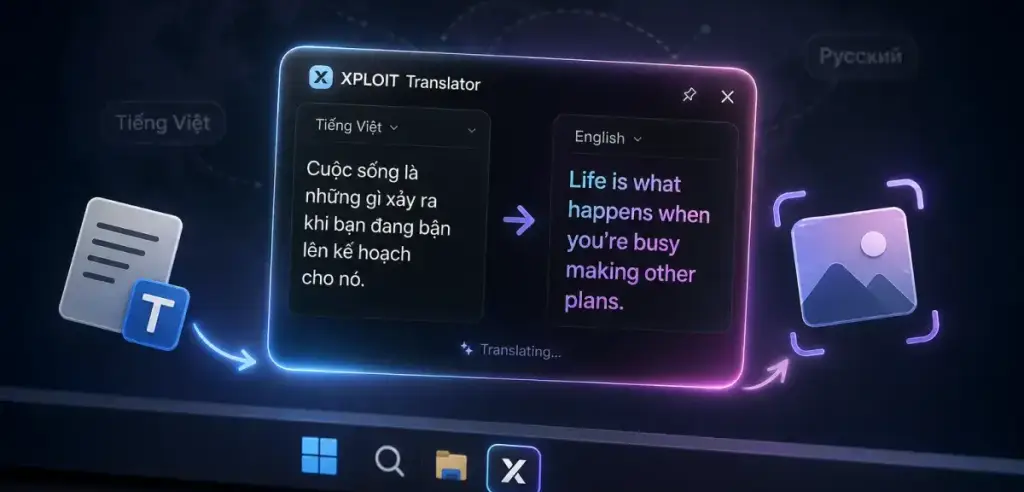
XPLOIT Translator is a tray widget for Windows. You copy anything, press Ctrl+Alt+T, and a small window rises above the taskbar with the translation already streaming in. Copy a screenshot and it reads the text off the picture. Click anywhere else and the window is gone and has forgotten what it held.
It is Tauri 2: a Rust backend with a Vue 3 webview. Almost everything interesting sits on the Rust side, which is the short version of this whole post.
Why an overlay and not a taskbar control
My first idea was a small field in the taskbar itself. That is not possible on Windows 11. The Windows 10 toolbars and deskbands are gone with no public replacement, so anything living in the taskbar today is a shell hack I do not want to ship.
The window positions itself instead. On show it reads the rcWork rectangle of the monitor under the cursor and places itself at the bottom left inside it. One call handles the taskbar height, multiple monitors, and per-monitor DPI, all of which I would have gotten wrong by hand at least twice.
Two flags do the rest. alwaysOnTop, obviously. And skipTaskbar, which quietly gives the window WS_EX_TOOLWINDOW and keeps it out of Alt+Tab, where a translation popup has no business appearing.
The clipboard decides what you meant
The app never asks whether you copied text or a picture. It looks.
A Windows clipboard can hold several formats at once, and a screenshot copied out of a browser usually arrives with an image and some HTML together. The tie-breaker is order: EnumClipboardFormats walks the list, and whichever came first is what the copying application considers primary. Windows appends its own synthesized formats after the real ones, so that order actually means something.
Text wins by default. Copy a sentence, you get the sentence. Copy a screenshot, you get the screenshot. There is no setting between the two, and I would like to keep it that way.
Pictures take a different route than text
An image goes two ways at once, and I got this wrong on the first attempt.
The full size PNG stays in Rust, parked in app state. It never crosses IPC. The translate_image command takes no image argument at all, just a request id, and picks up the pending image on the Rust side. Pushing several megabytes of base64 into a webview that will do nothing with it except get slower is work for the sake of work.
What the webview does get is a preview downscaled to 640 pixels on the longest edge, as a data URL, so it has something to render in the input area. That is the whole job.
The image prompt turned out to be mostly a list of prohibitions. Left alone the model wants to describe the picture: "the image shows a restaurant menu with three sections, listing appetizers and..." I do not want a description, I want the text translated, and most of the prompt is spent saying exactly that in different ways.
The API key never touches the web layer
capabilities/default.json grants the webviews core:default and nothing more. No clipboard plugin, no HTTP, no keyring, no global shortcuts. Every privileged operation is a Rust command listed in the invoke handler.
The key lives in the Windows Credential Manager under xploit-translator/openai_api_key, written through Win32 directly. It is not in the settings file and it never comes back over IPC. The frontend learns exactly one thing about it: a boolean called hasApiKey, which is enough to decide whether to open the settings window on first launch.
The rule I wrote for myself is short. When something is awkward on the frontend, do not add a plugin permission to make it easier. Add a command. It costs twenty lines of Rust and keeps the boundary where I put it.
Two places a stale stream can bite you
Every translation carries a request id generated in the frontend, and staleness gets checked on both sides. It has to be both.
In Rust, starting a request cancels the previous cancellation token and hands back a new one. The streaming client selects on that token at the request and again at every chunk. In Vue, the translation store drops any chunk, done, or error event whose request id is not the current one.
Skip either half and you get the same bug. You paste something new while the previous stream is still draining, and the old answer appends itself into the new translation. On screen it looks like the model lost its mind. It is two requests sharing one text buffer.
The cache has a related trap. Responses are keyed by sha256(kind + model + language + payload), FIFO, 200 entries, memory only. The model and the target language have to be in that key. Without them, switching from English to Russian hands you the previous language's answer straight out of cache, and that one is genuinely hard to spot, because it looks like the app ignored the setting rather than like a cache hit.
The Ctrl+C you never pressed
There is a setting, off by default, that makes the hotkey translate whatever is selected in the active window instead of the clipboard. Windows exposes no way to read another application's selection, so the app synthesizes Ctrl+C and reads whatever lands.
The synthetic keystroke has to release the hotkey's own modifiers before it sends C. With Ctrl+Alt+T bound, Alt is still physically down when the callback fires, so a bare C arrives as Ctrl+Alt+C. Bind something with Shift in it and you send Ctrl+Shift+C, which opens browser dev tools. Released modifiers never get pressed back either, because a synthetic key-down left behind convinces Windows that Alt is held until the user physically presses and releases it, and that is a fun bug to receive a report about.
It also only runs for the hotkey, never for a tray click, because clicking the tray makes Shell_TrayWnd the foreground window and the synthetic Ctrl+C would land in the taskbar. And it has to happen before the overlay shows, since showing steals focus and by then there is no selection left to copy.
Whether anything got copied is decided by polling GetClipboardSequenceNumber in 15 ms steps up to a 400 ms ceiling. That counter is the right primitive because reading it never opens the clipboard, so polling it does not fight the target application for the lock.
When the number does not move, the app falls through to the existing clipboard and says nothing about it. Nothing selected, an elevated window in front, an application that ignores Ctrl+C: all normal, none of them worth an error message. The price is that the shortcut thread blocks for up to 400 ms in exactly that case. I still leave the setting off by default, and I am not fully settled on whether it should exist at all.
Small decisions that cost more than they look
Requests go out with reasoning_effort: "none", because for translation reasoning buys latency and nothing else. The tiers disagree about which values they accept, though, and gpt-5-nano rejects "none" with a 400. So the app catches that particular error, records it for that model only, and retries once with "low". Per model, because marking every model as picky on the evidence of the cheapest one would quietly cost quality everywhere.
The SSE parser is hand written. Chunk boundaries can split an event anywhere, including in the middle of a multi byte character, and every target language here streams as multi byte UTF-8. Vietnamese and Chinese find that bug within about four words.
The list of target languages exists twice on purpose. Rust maps a code to the English name that goes into the prompt, because models follow an English instruction more reliably. The frontend maps the same code to a label written in that language itself, because someone picking Russian wants to see Русский in the dropdown. Adding a language means editing two files. I prefer that to a selector rendered in the wrong language or a prompt asking in one.
What it costs to run
The app is free and there is no account. You paste your own OpenAI key once and translation is billed to you directly.
| Model | $ / 1M tokens (in, out) | When |
|---|---|---|
gpt-5-nano | 0.05, 0.40 | cheapest, fine for ordinary text |
gpt-5.6-luna | 0.20, 1.20 | the default: fast and accurate |
gpt-5.6-terra | 2.00, 12.00 | rare languages and terminology |
Day to day on the default model this comes out to cents. The cache pulls more weight than I expected, because you paste the same thing twice far more often than you think you do.
Honest about the downsides
The version number still starts with a zero, and you can tell.
The builds are not signed, so SmartScreen warns on first launch and you have to click through More info and Run anyway. Every release ships a SHA256SUMS.txt. That is a checksum, not a signature, and the two are not the same thing.
There is no auto updater. New versions land on the releases page and you download the installer again.
Four target languages, not forty: English, Tiếng Việt, 中文, Русский. Adding more is two small files. I added the ones I use.
It needs an OpenAI key, so nothing works offline, and it is 64 bit Windows only.
Takeaway
The translating part is one HTTP request with a decent prompt. Everything that took real time was around it: working out what you meant by looking at clipboard format order, keeping two streams from writing into the same buffer, and putting the key somewhere the web layer cannot reach even if I write a bug. That ratio surprised me, though by now it probably should not.
The tool page with the current release and install notes is at /tools/xploit-translator. Source is on GitHub.